


Coinbase: Buy Crypto & Stocks
4.4117.59K Reviews
App Specs
- Version
- 14.21.22
- Updated On
- License
- Free
- Downloads
- 50,000,000+
- Developer
- Coinbase Inc
- Categories
- Finance
- Platform
- Android, iOS
Screenshots
 Analysis by AppCompare
I use a finance app differently when I know what I want to do before opening it: check a balance, research an asset, or make a deliberate trade. That distinction matters with Coinbase, because its straightforward presentation can make a complicated market feel approachable without making the risks disappear. I’d treat it as a place to manage decisions, not as a reason to make more of them.
A steady routine beats constant checking
A practical baseline is to open the app with a specific task in mind. I might review my portfolio, look at an asset I already follow, then close the app rather than chase every price move. A quick glance is useful for orientation, but it is not a substitute for deciding in advance how much risk I am comfortable taking.
For an everyday scenario, imagine checking your investments during a lunch break. The dashboard can help you see how your holdings are doing, but a short-term change in value is only one piece of the picture. I would avoid placing a rushed order just because an asset is moving while I happen to be looking. If I still want to act, I take time to review the order details and make sure the amount is intentional.
This habit is especially useful for beginners, who may otherwise confuse easy navigation with low-risk investing. Crypto prices can move sharply, and a clean screen cannot make an uncertain asset predictable. The app can simplify the mechanics; the judgment about whether to buy or sell still belongs to you.
Settings and account habits worth reviewing
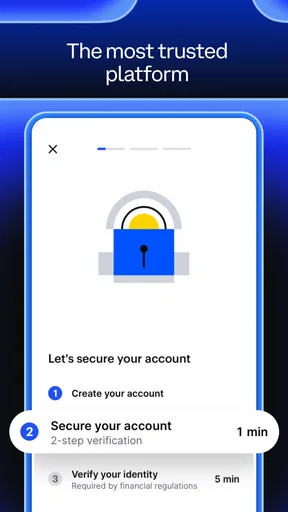
Before funding an account or making a first trade, I would review the available account and security settings rather than leaving everything at its default. Coinbase supports two-factor authentication and biometric sign-in, such as fingerprint access. Those options can make routine access more convenient while adding checks beyond a password. I would also make sure the email account used for financial accounts is protected, since app security is only one part of keeping access safe.
Biometrics are convenient for unlocking, but I would not treat them as a reason to share a device or ignore account alerts. If you use a phone that other people can access, think carefully about what remains signed in and how the device itself is protected. When traveling or using a shared network, I prefer to wait until I have a connection I trust before handling account activity.
Another useful habit is separating research from action. Educational material can help explain unfamiliar crypto terms, but learning about an asset is not the same as deciding it belongs in your portfolio. I’d read first, check what I actually understand, and only then consider whether an order makes sense for my goals.
Worth Reading Before You Choose

Flipboard Shows What News Apps Must Do Beyond the Feed

Switching to Android Auto Means Rethinking Your Driving Routine

Google Calendar Makes a Crowded Week Easier to Manage

Ludo King Makes the Most of the Minutes Between Plans

Baby Panda World Brings Quick Play to Modern Phones, but Its Game Library Feels Busy

ESPN’s Live Game View Makes Following Close Games Easier
Making the interface work for you
The main advantage of having portfolio information and trading tools together is convenience, but convenience can also encourage unnecessary activity. I find it more helpful to use the overview as a periodic check-in than as a prompt to react to every fluctuation. A repeatable routine—review, research, confirm, then either act or leave things alone—makes it easier to distinguish a considered trade from an impulse.
Coinbase is a finance app from Coinbase Inc, and its broad mix of assets will appeal to people who want to explore crypto alongside other financial products in one place. The app is free to install, is rated for Everyone, and has an average rating of 4.4 from around 926,000 ratings. It has been available since March 6, 2013, and its current version is 14.21.22, with a minimum operating-system requirement of 8.1. Its reach—over 50 million installs—also means a new user is choosing a widely used service, not an obscure experiment.
For someone comparing options, the key question is how much guidance and simplicity they want versus how much control and fee efficiency they need. A basic brokerage app may suit someone focused mainly on conventional investments, while a specialist exchange may better fit a trader who prioritizes detailed order controls. Coinbase sits in the middle: accessible enough to explore, but broad enough that I would still take time to learn each screen before using it with real money.
Where convenience has limits
Before confirming an order, I would check the asset, the amount, and the final transaction details rather than tapping through from habit. This small pause is a useful safeguard when browsing several markets in one app: a familiar interface can make different choices feel more similar than they are. Keeping notes about why I made a trade can also help me review my own decisions later instead of relying on memory or the latest market mood.
Fees deserve the same attention. The original article’s practical warning still applies: Coinbase may not be the lowest-cost choice, particularly for frequent trading. If you trade often, compare the costs and workflow of the available options before settling into a routine. A lower-fee, more advanced platform may be a better fit if you understand its order tools and are comfortable with the extra learning; a simpler screen is not automatically worth paying more for if you do not use its convenience.
I would also avoid treating the app’s range as a reason to spread money across products I have not researched. Seeing an asset in the same place as familiar holdings does not make it equally suitable. For a cautious beginner, starting with observation and educational reading may be more sensible than trying to use every feature immediately.
Getting to Know Coinbase
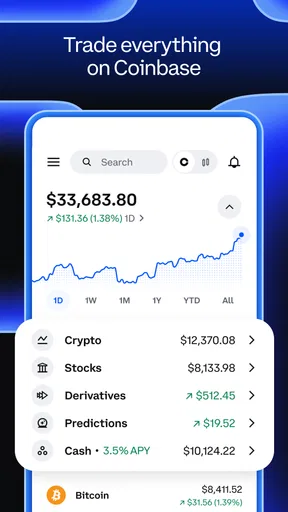
First off, let’s talk about the user interface. When you first open the app, it feels like someone took the essence of modern design and splashed it all over your screen. It’s clean, sleek, and doesn’t overwhelm you with too much information right off the bat. This is a big win, especially for beginners who are just dipping their toes into crypto waters.
Now, while the design gets a thumbs up, the functionality is where Coinbase: Buy Crypto & Stocks really shines. Once you’re logged in, the dashboard provides a comprehensive view of your portfolio. You can see at a glance how your assets are performing, which is incredibly handy for those moments when you just need a quick update.
Navigating the Crypto Seas
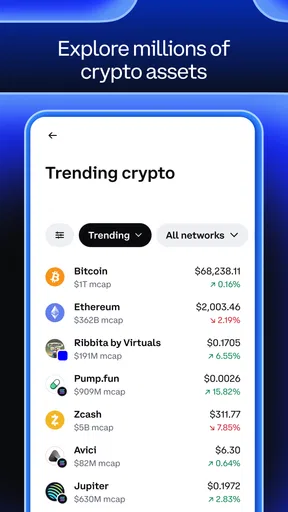
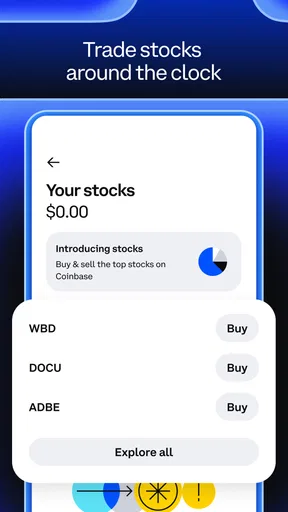
Alright, let’s get into the nitty-gritty. Buying and selling on Coinbase is as straightforward as ordering a pizza. Seriously, it’s that simple. You can easily access a wide variety of cryptocurrencies, from Bitcoin to those altcoins you’ve only heard whispers about. Plus, with their recent addition of stock trading, you’ve got a one-stop-shop for diversifying your investments.
One thing I really appreciate is their educational content. If you’re a newbie like me, you’ll find the resources provided incredibly useful. They’ve got tips, articles, and even quizzes to help you get a better understanding of the crypto world. It’s like having a mini crypto school in your pocket.
Security and Peace of Mind
Now, onto something that’s on everyone’s mind: security. Coinbase takes this seriously, implementing two-factor authentication and biometric logins, like fingerprint scanning. It’s always reassuring to know that they’re putting in the effort to keep your digital assets safe. They also offer insurance on your funds, which, let’s be honest, is like a warm security blanket in the volatile world of crypto.
But remember, while Coinbase does its best to safeguard your investments, it’s still crucial to practice good personal security habits. Always be cautious and make sure you’re using a secure network when accessing your account.
The Cost of Convenience
Okay, let’s talk fees. Coinbase isn’t exactly the cheapest option out there. They have a pretty straightforward fee structure, but it can add up, especially if you’re making frequent trades. However, I find the ease of use and the breadth of services offered justify the slightly higher costs for many users.
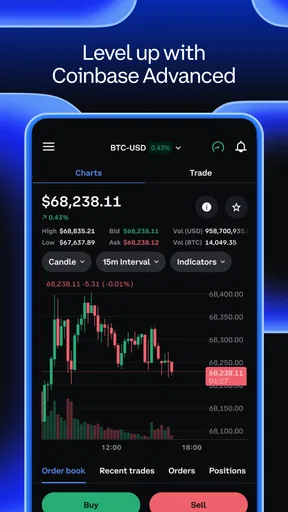
For those who are more experienced and looking for lower fees, you might want to consider their other platform, Coinbase Pro. It offers more advanced trading options at a lower cost, but it does come with a steeper learning curve.
Final Thoughts
So, what’s the verdict on Coinbase: Buy Crypto & Stocks? If you’re looking for a user-friendly, reliable platform to start your crypto journey, it’s definitely worth considering. The app offers a great balance of accessibility and functionality, making it a solid choice for both beginners and seasoned traders alike.
Sure, it’s not perfect, and the fees might be a bit on the higher side, but the peace of mind, security features, and educational resources make it a compelling option. Plus, the convenience of having both crypto and stock trading in one place is a huge bonus.
So, whether you’re a crypto novice or a seasoned trader, give Coinbase a try. You might just find it’s the perfect fit for your investing needs. Happy trading!
Who will get the most from it
I’d recommend Coinbase to someone who wants a relatively approachable way to explore crypto, keep an eye on a portfolio, and learn basic concepts without starting with a specialist trading interface. Its educational material can help a curious newcomer build vocabulary before making decisions, while the dashboard gives returning users a quick overview without requiring them to navigate a more technical setup every time.
It is less compelling for someone whose main priority is the lowest possible cost on frequent trades, or for a person who wants deep control over order execution from the outset. It may also be the wrong first step for anyone who is not comfortable with the possibility of losing money. If your goal is simply to build a conventional investment portfolio, a brokerage focused on that need may offer a more direct experience than a platform that also puts crypto front and center.
A useful way to compare the alternatives
Compared with a conventional brokerage, Coinbase makes crypto exploration a more central part of the experience and brings a broader set of financial products into one account. That breadth is convenient if you want to research different asset types in one place, but it can make the app feel like more than you need if you only want to manage traditional investments. Compared with a specialist crypto exchange, its approachable presentation is a plus for learning and routine checks, while a more advanced venue may suit experienced traders who value detailed controls and are willing to accept a steeper learning curve.
I would compare the actual workflow, not just the headline feature list: how clearly each app shows order details, how comfortable you feel navigating it, and what the costs look like for the way you intend to trade. Those trade-offs matter more than choosing the app with the longest menu of assets. If you are still learning, clarity may be worth more than a tool you do not yet know how to use; if you already trade actively, fee structure and order controls may deserve more weight.
Small checks that prevent avoidable mistakes
One practical approach is to decide on a review schedule and stick to it, rather than checking whenever a notification or market headline catches your attention. During a scheduled check, I would review the portfolio, read about only the assets I am considering, and make a separate decision about whether to place an order. This creates a little distance between seeing a price change and reacting to it.
For an occasional buyer, a second helpful check is to look at the transaction summary every time, even when the intended purchase seems routine. Confirm that you selected the right asset and amount, then review the displayed costs before proceeding. That pause is especially worthwhile when you are comparing unfamiliar cryptocurrencies, because similar names or a quick tap can make a deliberate choice harder to verify afterward.
Coinbase is free to install, but that does not mean every action inside it is cost-free. I would distinguish the cost of getting the app from the costs associated with trading, and check the details shown for a transaction before confirming it. If frequent activity makes those costs feel material, that is a sensible point to compare another platform rather than assuming convenience is always the better bargain.
What I would learn before expanding beyond the basics
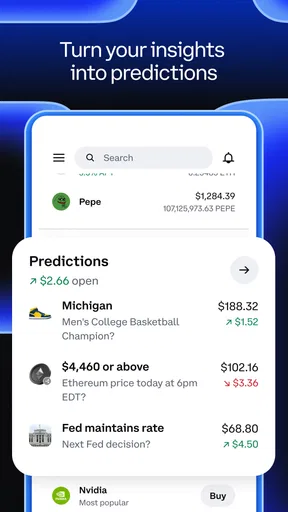
The app’s wider market offering can be tempting, but I would not assume every product works like buying a familiar cryptocurrency. Stocks, derivatives, predictions, and other markets can involve different mechanics and risks. Before using a product beyond straightforward research or a basic transaction, I would take time to understand what the position represents, how it can change in value, and what the order screen is asking me to confirm.
That is where the educational resources are most useful: as a starting point for questions, not as a shortcut around independent judgment. I would use them to identify unfamiliar terms, then make sure I can explain the trade to myself in plain language. If I cannot, I would wait. A broad app can make exploration easier, but it cannot decide whether an investment matches your time horizon, financial situation, or tolerance for risk.
My considered verdict
My overall view is that Coinbase works best when simplicity and a broad set of markets are genuine needs, not just attractive extras. Its clean dashboard, learning material, and familiar buying and selling flow can make it easier to get oriented than a more technical exchange. The trade-off is that frequent traders may find the costs less attractive, and people who want only conventional investing may prefer a more focused brokerage.
If you try it, I would begin by securing the account, exploring the educational material, and learning where the order details appear before committing money. Then build a calm routine around research and review, rather than treating the app as a stream of prompts to trade. That is the version of Coinbase I can recommend: useful and approachable, provided you bring patience, check the costs, and stay clear about the risks you are taking.
Pros
- User-friendly interface for beginners.
- Supports a wide range of cryptocurrencies.
- Real-time price alerts and updates.
- Secure with two-factor authentication.
- Integrated news and educational resources.
Cons
- Higher fees compared to some competitors.
- Limited customer support options.
- Requires ID verification for transactions.
- Limited advanced trading features.
- Not available in all regions.
FAQs for Coinbase: Buy Crypto & Stocks
What is Coinbase: Buy Crypto & Stocks, and how does it work?
Coinbase: Buy Crypto & Stocks is a popular platform that allows users to buy, sell, and manage cryptocurrencies and stocks. It provides a user-friendly interface for both beginners and experienced traders. Users can connect their bank account or credit card to start trading, and the app offers a secure environment with various tools for tracking and managing investments.
Is Coinbase secure for trading cryptocurrencies and stocks?
Yes, Coinbase is considered one of the most secure platforms for trading cryptocurrencies and stocks. It employs advanced security measures, including two-factor authentication, biometric verification, and insurance for digital assets stored online. Additionally, the majority of funds are stored offline in cold storage, further enhancing security against cyber threats.
What fees are associated with using Coinbase?
Coinbase charges fees for various transactions, including buying, selling, and converting cryptocurrencies and stocks. The fees vary based on the transaction amount and payment method. It's important to review the fee structure on their website or app to understand the costs involved before trading. Some users may find the fees higher compared to other platforms.
Can I use Coinbase for both crypto and stock investments?
Yes, Coinbase offers the ability to invest in both cryptocurrencies and stocks. This makes it convenient for users who want to diversify their investment portfolio within a single app. The platform regularly updates its offerings, so users should check for the latest available stocks and cryptocurrencies they can trade.
Is Coinbase suitable for beginners in crypto and stock trading?
Coinbase is designed to be user-friendly, making it suitable for beginners in both crypto and stock trading. The app offers educational resources, tutorials, and a simple interface to help new users understand the trading process. However, beginners should start with caution and educate themselves about the market risks associated with investing.


